
Support
Lost License Keys
If you’ve purchased a product from Fat Cat Software in the past but have lost track of your license key, visit the Lost License page to have it emailed back to you.
Troubleshooting
If you’re having an issue with any Fat Cat Software products, first be sure to follow these basic troubleshooting steps:
- Check to see if you’re running the latest version of the software. You can check to see if there is a newer version available by selecting the “Check For Updates” menu item within the program. It is often the case that a problem has already been addressed in an update, and downloading the latest version fixes the problem.
- Consult the documentation to see if there is already a known solution. Links to documentation for each program can be found to the right.
Contact
Fat Cat Software offers full email support for its products. If you are having trouble, have a suggestion for a new feature or even just wish to comment on something, please contact us by following the steps below.
PowerPhotos
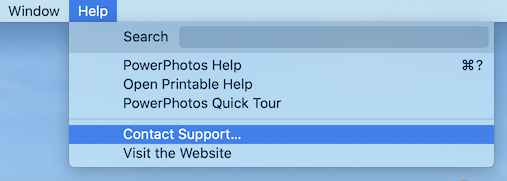 If you already have PowerPhotos installed, the best way to reach us is to open the application on your Mac, go to the Help menu at the very top of the screen, and select the “Contact Support” menu item. This will open a window where you can describe your problem and send along logs and screenshots that will help us troubleshoot your problem.
If you don’t have the app installed yet or are having trouble accessing that support window, you can also email us at support@fatcatsoftware.com. Please include a description of your problem and the version of macOS (select “About This Mac” from the Apple menu) and PowerPhotos (select “About PowerPhotos” from the PowerPhotos menu) you’re currently running.
PlistEdit Pro
Email us at support@fatcatsoftware.com with a description of your problem and the version of macOS (select “About This Mac” from the Apple menu) and PlistEdit Pro (select “About PlistEdit Pro” from the PlistEdit Pro menu) you’re currently running.